
Release 4.32
🔍Learn What's New:
Master Order Modify - Change Orders Across Portfolios in One Action ENHANCEMENT
STRATEGY MANAGERSPORTFOLIO MANAGER
Strategy Managers and Portfolio Managers can now modify master orders after submission - with changes cascading automatically to all child orders.
What's New
Modify Master Order — Change Order Type, Price (Limit), or Quantity from the order row; changes cascade to all child orders. Quantity is redistributed using original allocation weights. An allocation preview table shows per-client redistribution before you confirm.
Modify Child Order Independently — Expand a master order and modify a specific child without affecting siblings. The modified child is flagged with a ✎ icon. Master order totals recalculate automatically to stay in sync.
Cancel Master or Child Order — Cancel a master order to cascade cancellation to all non-filled children, or cancel a single child independently. Filled portions are always preserved. A confirmation dialog shows which orders will be cancelled vs. preserved before you commit.
Status-Gated Actions — Modify and Cancel are available for orders in READY, IN PROGRESS, EXECUTION, or PARTIALLY FILLED. Actions are blocked once an order reaches a terminal state: FILLED, EXPIRED, CANCELLED, or DONE.
Re-validation on Quantity Increase — Increasing quantity re-runs per-client validation. Individual and bulk margin approval available.

Holdings weight recalculation applies exclusively to active strategies. Passive strategies with fixed model weights are not affected.

👉 For more details, refer to the guide below:
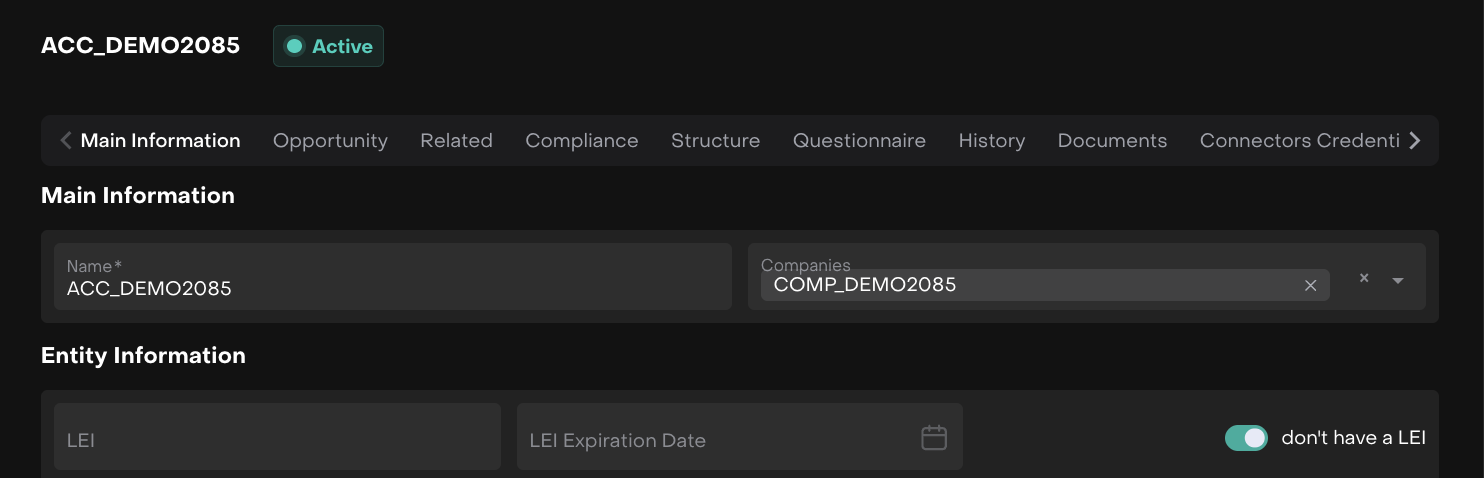
Entity Accounts: LEI Field Made Optional ENHANCEMENT CLIENT ADMINISTRATER
A new "Don't have LEI" toggle has been added to the Entity Information section next to the LEI and LEI Expiration Date fields. When enabled, both fields are disabled and their validation is removed. Disabling the toggle restores the fields to their active state.
Added Separate Columns for Each Manager Role ENHANCEMENT MANAGER
The Portfolios table now exposes individual columns for each manager role - SALES MANAGER, PORTFOLIO MANAGER and PARTNER - allowing you to view and filter managers by their specific role directly in the table.
Strategy Holdings Search Now Displays Ticker ENHANCEMENT MANAGER
The instrument ticker is now shown in the holdings search results within the Strategy view, making it easier to identify instruments quickly without opening each one separately.
Fixed: Inconsistent Rounding Between Omnibus and Virtual Bank Accounts' Transactions FIX BACK OFFICE
Under certain conditions, transaction amounts on Omni and Virtual BA portfolios could be rounded differently, causing discrepancies. The rounding behaviour is now consistent across both levels.
Fixed: Minimum Investment and Rate of Risk Not Displayed on Marketplace Product Cards FIX CLIENT
Minimum Investment Amount and Rate of Risk are now correctly displayed on product cards in the Marketplace.
Other minor bugs and fixes have also been resolved to ensure a smoother experience
This release highlights the key updates and features in Reluna v4.32. For more details, check the platform or Contact Support. We hope you enjoy the new features!
