
Track Coupon and Dividend Payments
Introduction
The Reluna platform helps you track upcoming coupon and dividend payments. This ensures you don’t miss expected payments from Custody and helps prevent related issues.
How The Platform Knows Income Must Be Paid
Each Asset contains a Coupon or Dividend Calendar. Every day, the platform checks for assets with a payment date matching the current date. When the appropriate Asset is found and it is on the Client Position, the platform generates an income transaction where Status Reason = Order.
Status Reason = Order means that it is a platform-generated transaction which has not yet been received from the Custody but is expected on the next Trade Date or on the Value Date of the payment.

Transactions with Status Reason = Order are generated only for securities (assets with coupon or dividend calendars). They are not created for other asset types.
Tracking Upcoming Incomes
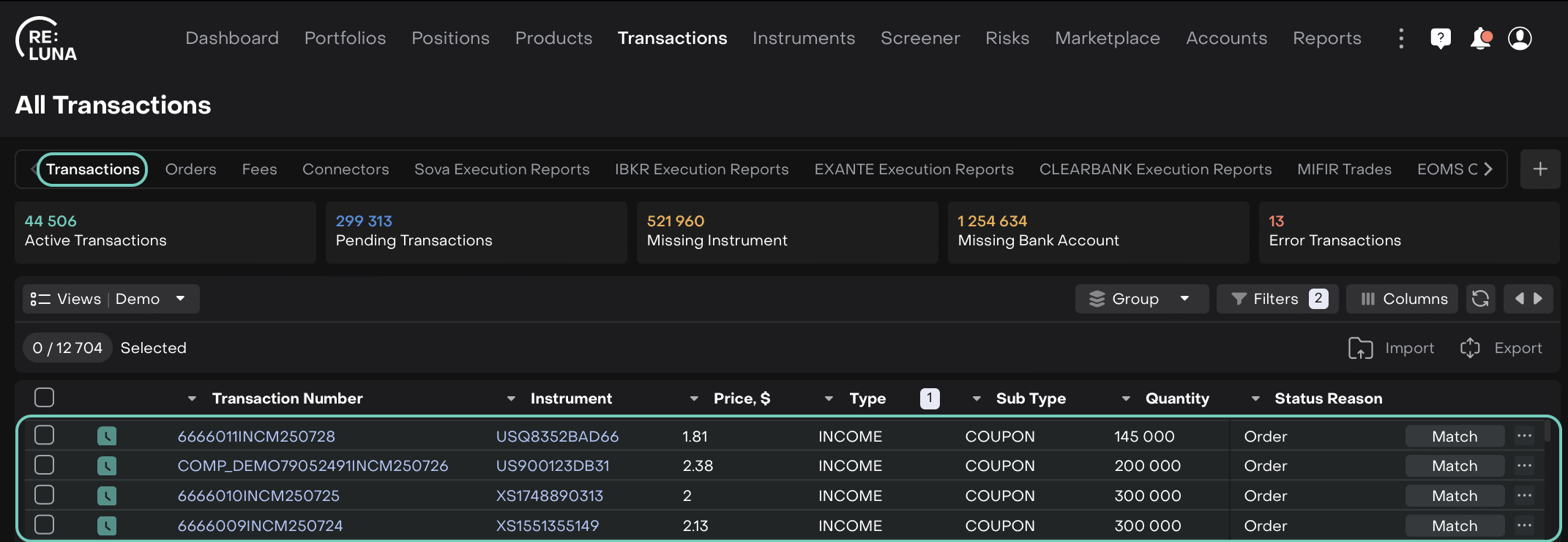
To track incomes that are due in the near future, use the platform’s existing “Missing Incomes” view or create your own.
The “Missing Incomes” view contains only income transactions with Status Reason = Order. From the table, you can track:
Asset → “Instrument” field
Income Amount → “Net Amount PF” (Ccy) field
Currency (of the amount to be paid) → “PF Ccy” field
Client Bank Account (where asset is held) → “Bank Account” field
Managing Incomes
Tracking Unpaid Incomes
The Back Office Manager should check whether the income has been received from Custody on the Value Date.
If the Value Date has arrived but the income has not been received, the Manager should contact Custody to confirm the payment status.
If the Value Date is updated, this change should also be reflected in the platform → the Manager can open the transaction and update the Value Date.
Matching With Custody Data
When income is received from Custody, it should automatically match with the income in Status Reason = Order. During matching, the Value Date is updated to the actual payment date when the funds were received.
If transactions do not match, possible reasons include:
Incorrect transaction data
Technical error

To match incomes received from the Custody with Order transactions platform checks:
bank accounts are the same
asset is the same (by ISIN)
transaction date of the order income is “before or at the date” of the Custody income transaction date
Gross Amount of the incomes are the same
In case of mismatches:
If Custody transaction details are incorrect → correct them and manually match using the matching functionality.
If incomes are the same but not matched → manually match and inform Technical Support.
If income is received from Custody but no order income exists → approve the transaction using the “Approve” function and inform Technical Support.
Impact On Calculations
Cash positions → No impact
Asset positions → They affect asset performance