
Use Reconciliation
Introduction
The Reconciliation feature is designed to ensure data consistency between bank reports and the platform system. This is a critical process for maintaining accurate records and identifying discrepancies in a timely manner.
The latest update significantly enhances the reconciliation functionality and now includes:
Enhanced statistics for each connector
Three specialized views for different types of analysis
Improved export and filtering tools • Dedicated view for omnibus accounts
What is reconciliation ?
Reconciliation is the process of comparing bank data with platform data to ensure they match, including verifying that bank positions on each bank account align between the bank and the platform.
Accessing Reconciliation
You can access reconciliation data in two ways:
Go to the Reconciliation page from the dashboard.


Use the Connectors tab to check file upload status, identify failed files and reprocess them if needed.
🔗 Check out Using the Connectors guide for more details.
👉 New to some terms? Check out our full Platform Glossary for more.
Reconciliation metrics overview
For each connector (bank account), detailed reconciliation statistics are now
displayed in a summary card format:
Reconciliation %- Overall match percentage (e.g., 100%)
Unmatched - Number of positions that did not match
Matched - Number of positions that successfully matched
Total - Total number of positions processed

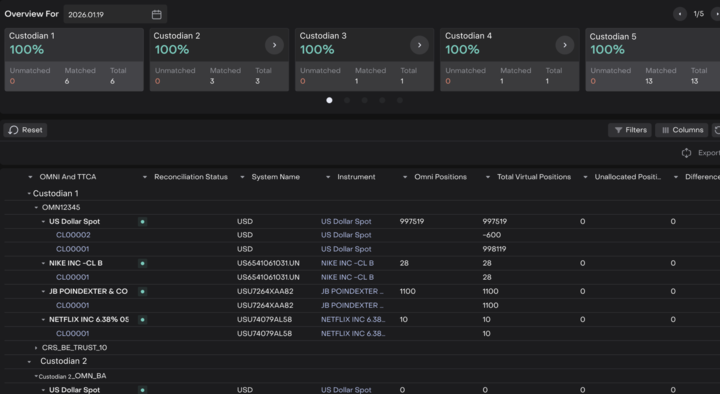
For the OmnibusTestV3.01 connector, the statistics appear as follows:
Reconciliation Status: 100%
Unmatched: 0 positions
Matched: 13 positions
Total: 13 positions
💡 INTERPRETING RESULTS
A reconciliation percentage of 100% means all positions match perfectly
between the bank and system. Any value below 100% requires investigation.
Reconciliations view
The reconciliation functionality is divided into three independent views,
each serving specific purposes. Switch between views using the tabs at the
top of the page:
Reconciliation By Positions
Reconciliation By Position & Transactions
Reconciliation Omni Vs Virtual Bank Accounts
Transactions
Reconciliation by Positions
PURPOSE: Compares Bank Positions Vs. System Positions for the selected date
This is the standard reconciliation view that directly compares positions
reported by the bank with positions recorded in the platform system. It helps
identify discrepancies in holdings at a specific point in time.
WHEN TO USE:
Daily position verification
End-of-day reconciliation
Identifying missing or extra positions
Quick health check of account balances
WHAT YOU WILL SEE:
All instruments held across connectors
OMNI And TTCA - hierarchical account structure
Reconciliation Status - match status for each position
System Name - instrument name in the system
Instrument - full instrument name
Omni Positions - positions on the omnibus account
Total Virtual Positions - sum of positions on virtual accounts
Unallocated Position - unallocated positions
Dif - difference between positions

💡 KEY POINT
This view shows the current state of positions and serves as the starting
point for daily reconciliation.
Reconciliation By Position & Transactions
PURPOSE: Compares Previous Day (T-1) Positions With Transactions For That
Same Day
This view provides more detailed reconciliation by considering not just
current positions, but also the transactions that affected them. Since
transaction data from the bank is received with a one-day delay, this view
reconciles yesterday's positions with the transactions that occurred on
that day.
WHEN TO USE:
Transaction-level verification
Identifying specific trades or movements that caused discrepancies
Audit trail validation
Investigating sources of position differences
KEY FEATURES:
Reconciles positions from T-1 (previous day)
Includes all transactions that affected positions on that day
Accounts for one-day delay in receiving transaction data from banks
Provides complete audit trail for position changes
💡 IMPORTANT NOTE
Since transaction data is received with a one-day delay, this information
is displayed at the top of the screen: "Compares Previous Day (T-1)
Positions With Transactions For That Same Day. Transaction Data Is Received
From The Bank With A One-Day Delay"
Reconciliation Omni Vs Virtual Bank Accounts
PURPOSE: Compares OMNI/TTCA Accounts With Their Virtual Sub-Accounts
This specialized view is designed exclusively for omnibus accounts. It
verifies that total positions in the omnibus (OMNI) account match the
aggregated sum of all linked virtual sub-accounts. This ensures internal
consistency within the platform's account structure.
WHEN TO USE:
Omnibus account verification
Internal platform consistency checks
Identifying allocation errors across virtual accounts
Ensuring proper position distribution
WHAT YOU WILL SEE:
Statistics for each connector with Omnibus bank accounts
Reconciliation percentage for OMNI bank accounts vs. Virtual bank accounts
Detailed position breakdown showing:
OMNI Positions (positions on the main account)
Total Virtual Positions (aggregated virtual account positions)
Unallocated Position (unallocated positions)
Dif (difference)
Recommended daily process:
Start with Reconciliation By Positions to verify current day positions
Check the reconciliation percentage for each connector:
100% = Everything is reconciled
< 100% = Investigation required
If discrepancies are found (reconciliation % < 100%), switch to
Reconciliation By Position & Transactions for transaction-level analysis
For omnibus accounts, regularly check Reconciliation Omni Vs Virtuals to
ensure internal consistency
Use the Export function when detailed analysis or reporting is needed
Document any findings and actions taken for audit purposes
💡 BEST PRACTICE
Perform reconciliation daily at the same time. This helps you quickly
identify and address issues before they compound.
TIME-SAVING TIPS:
If all connectors show 100%, you can quickly verify everything is correct
Focus your attention on connectors with < 100% reconciliation
Use filters to quickly isolate problematic positions
Set up a regular schedule for omnibus account checks