
Release 4.31
🔍Learn What's New:
Master Order Creation - Place and Allocate Orders Across Portfolios in One Action ENHANCEMENT
STRATEGY MANAGERSPORTFOLIO MANAGER
Strategy Managers and Portfolio Managers can now create a single master order that is automatically distributed across all relevant client portfolios and bank accounts - replacing the need to place individual orders per Client.
What's New
Three Entry Points – Start from Portfolio Positions, the Strategy Execution tab, or Global Positions; each pre-loads the relevant accounts automatically
Auto Allocation – Two automatic methods: By Bank Account AUM or By Available Cash; allocation calculates instantly with no separate "Calculate" step
Manual Mode – Enter each account's quantity directly when automatic distribution is not appropriate
Custodian Grouping – The allocation table is grouped by custodian with per-group execution parameters: DMA / OTC, Time in Force, Exchange
Three-Tier Validation – Each account is classified as OK, Margin Pending, or Funding Issues; individual and bulk margin approval available
One-Click Submit – Click Buy or Sell to create the master order and all child orders atomically
Executions View – After submission, master orders are visible with an expandable parent-child hierarchy showing individual child order statuses

👉 For more details, refer to the guide below:
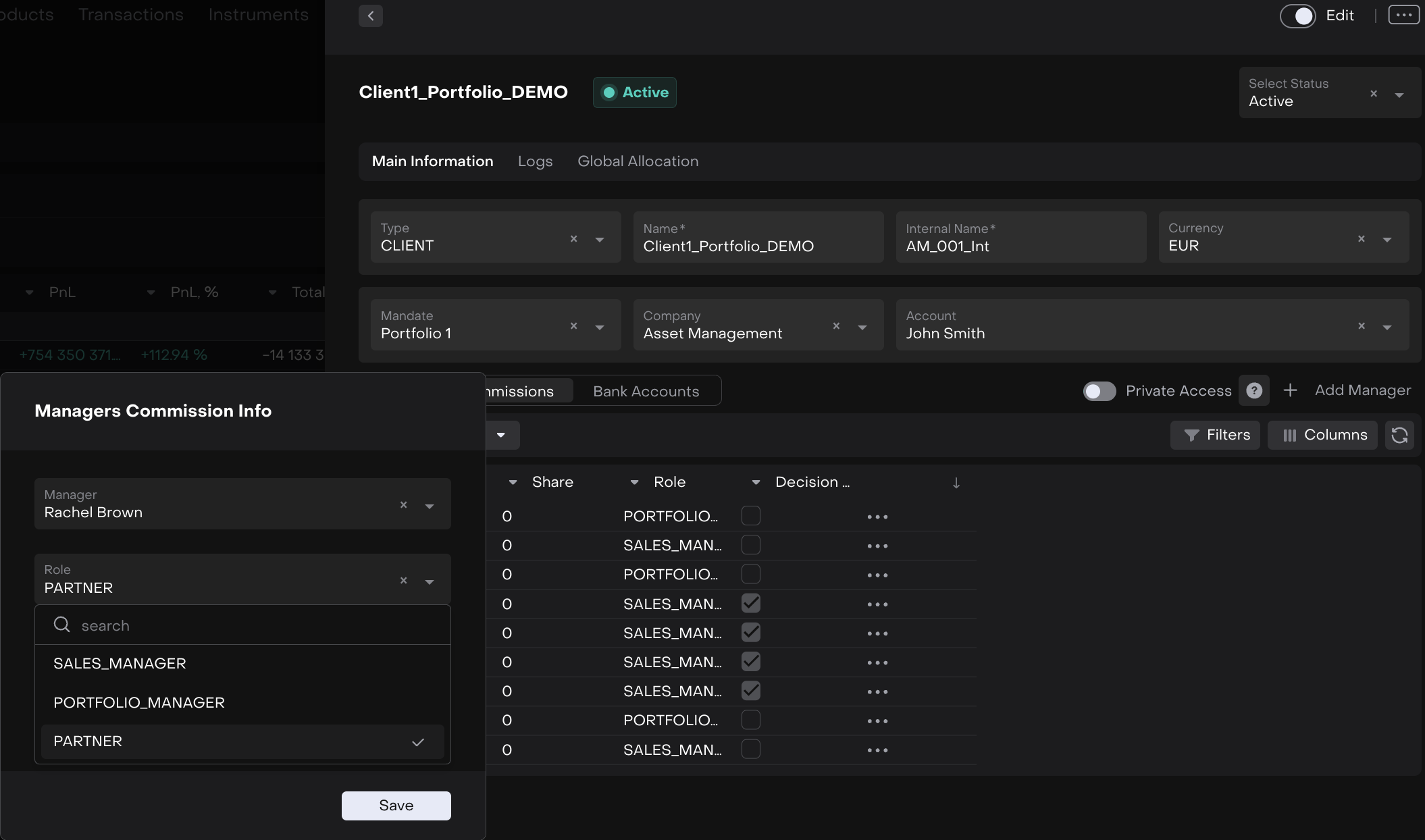
Added Managers Commissions: New PARTNER Role and Multi-Role Display in Tables ENHANCEMENT
MANAGERSPORTFOLIO MANAGER
PARTNER added to the Role dropdown in Portfolio Settings → Managers Commissions
ManagerRole column now shows a comma-separated list of unique roles instead of a blank when multiple managers are assigned
Beta version of Custom Market Data Connectors - Connect Your Own Pricing Sources ENHANCEMENT CLIENT ADMINISTRATOR
You can now integrate a proprietary pricing source directly into Reluna - without contacting support. Custom connectors load data into instrument rolling fields automatically via scheduled SFTP or email.
👉 For more details, refer to the guide below:
🔗 https://resources.reluna.com/kb/custom-market-data-connectors
Beta version of set of Bank Connectors via mail and sftpENHANCEMENT CLIENT ADMINISTRATOR
Custodian Connector Management lets Managers and Administrators establish automated data connections to custodian banks directly from Reluna - without engineering involvement.
Transactions and positions from custodians are retrieved automatically and made available in the platform.
System connectors (pre-built by Reluna) can be connected in two steps. For custodians not in the library, Administrators can build a custom connector from scratch.
👉 For more details, refer to the guide below:
🔗 https://resources.reluna.com/kb/custodian-connector-management
More Flexibility in Lead Status Management ENHANCEMENT CLIENT ADMINISTRATOR
It is now possible to move leads to Suspended or Lost from earlier stages in the qualification process, without having to go through intermediate steps:
Leads in Unqualified or Ready to Qualify can now be set to Suspended
Leads in World Check or Ready to Qualify can now be set to Lost
Fixed: Criteria Settings in Change Request Approvers FIX ADMIN
Fixed Approvers configuration in Change Requests:
Shows Criteria toggle now only available for Field type – The Show Criteria toggle was previously visible for all approver types (user, department, role, field). Since criteria settings are not supported for manual set up for the Field type, the toggle is now hidden for all other types.
Fixed Value Date Rule not being applied as expected on orders FIX BACK OFFICE
Resolved an issue where the Value Date field was not automatically populated according to the configured Value Date Rule. When a rule with specific conditions (e.g., AssetType ≠ CASH with a 1-day offset) was set up, the field was filled with an incorrect date instead of the expected calculated value.
Fixed: PNG Files Failed to Download from Lead Documents FIX CLIENT ADMIN
The issue has been resolved and PNG attachments now download correctly alongside all other supported file types.
👉 For more details, refer to the guide below:
🔗 https://resources.reluna.com/kb/user-guide-value-date-rules

Other minor bugs and fixes have also been resolved to ensure a smoother experience
This release highlights the key updates and features in Reluna v4.31. For more details, check the platform or Contact Support. We hope you enjoy the new features!
