
Sectors Widget
AVAILABLE IN: 

Introduction
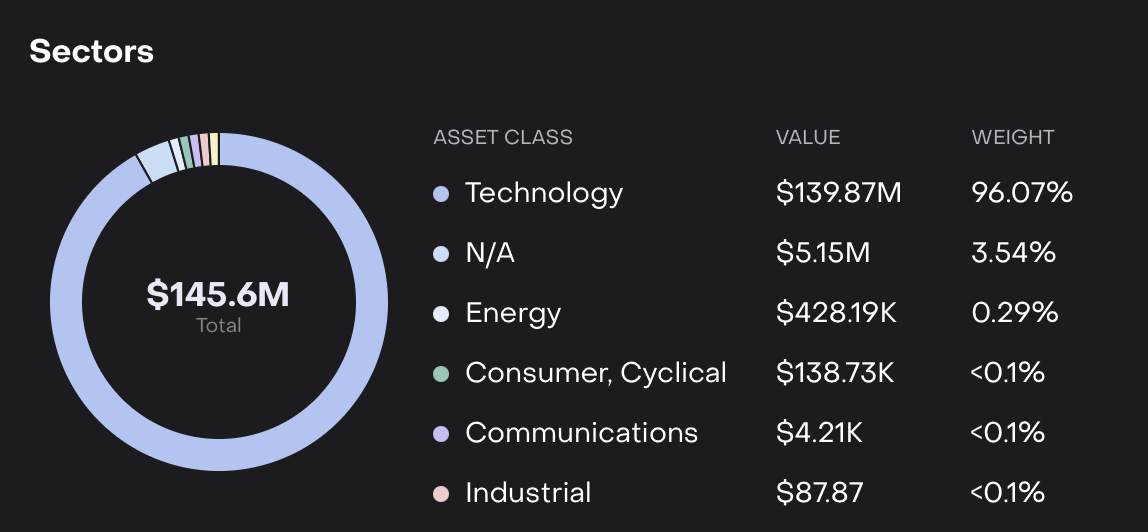
The Sectors widget provides a breakdown of your portfolio by industry sector, helping you assess diversification and concentration. It allows you to see how much of your portfolio is allocated to each sector both in terms of weight (%) and value ($).
What it Shows
Sector Name: Industry category assigned to each instrument (e.g., Technology, Energy, Consumer Cyclical, etc).
Weight (%): Percentage of the portfolio invested in the sector.
Value ($): Monetary value of holdings in that sector.
How to Read the Widget
Discrepancy Between Weight and Value:
A sector may show a small weight but a large absolute value depending on the total portfolio size and other sector allocations.

Example: Technology may show 96.07% ($139.87M), while Energy shows only 0.29% but still holds $428.19M due to overall portfolio valuation.
N/A Sector:
Positions without a defined sector classification are grouped under N/A.
Dynamic Updates:
Values change based on filters such as date, portfolio currency or bank account selection.